



Features
FEATURES
2.1 Executive Summary of Capabilities
Dokan Conditional Category Attributes version 3.2 represents a mature solution for attribute governance in multi-vendor WooCommerce ecosystems. Unlike generic WooCommerce extensions that merely add fields or modify display logic, this plugin implements a full-stack attribute control system spanning the database layer, the administrative interface, the vendor dashboard, and the customer-facing storefront. The feature set is designed not only to restrict attribute visibility but to fundamentally improve data quality, reduce vendor onboarding friction, and enhance the discoverability of products through cleaner frontend navigation.
Every feature described in this section has been developed with enterprise scalability in mind. Whether your marketplace hosts ten vendors or ten thousand, whether your catalog contains one hundred products or one million, the plugin’s architecture ensures consistent performance and reliable behavior. The following subsections provide granular detail on each major capability cluster, explaining not only what the feature does but why it matters for your business operations and how it interacts with the broader WooCommerce and Dokan ecosystems.
2.2 Conditional Attribute Visibility Engine
The cornerstone feature of the plugin is its Conditional Attribute Visibility Engine (CAVE). This engine provides administrators with the ability to create explicit allow-lists of global attributes for each product category in the WooCommerce taxonomy. In standard WooCommerce, global attributes are universal—they appear for every product, in every category, regardless of contextual relevance. CAVE disrupts this paradigm by introducing conditional logic: an attribute exists in the vendor’s field of view if and only if the category (or one of its ancestors) explicitly permits it.
The engine operates on a resolution algorithm that evaluates category assignments in real time. When a vendor selects a category during product creation, the engine queries the term metadata for that category ID. If a configuration exists, it is returned immediately. If no configuration exists, the engine recursively checks parent categories up the taxonomy tree until it either finds a configuration or exhausts the hierarchy. This resolution is performed both server-side (during product save operations) and client-side (via JavaScript in the Dokan dashboard), creating a redundant validation layer that prevents inconsistent data states.
The practical impact of CAVE is substantial. Consider a multi-vendor electronics marketplace. Without attribute conditioning, a vendor listing a smartphone would see irrelevant attributes such as “Shoe Size”, “Fabric Type”, “Neckline Style”, and “Wheel Diameter”. These irrelevant fields clutter the interface, increase cognitive load, and lead to data entry errors where vendors accidentally populate incorrect fields. With CAVE enabled, the administrator configures the “Smartphones” category to only show “Brand”, “Operating System”, “Storage Capacity”, “RAM”, “Screen Size”, and “Color”.
The vendor interface becomes streamlined, intuitive, and contextually aware.
The engine also respects WooCommerce’s attribute architecture. Global attributes (those prefixed with
pa_ and stored in the woocommerce_attribute_taxonomies table) are subject to filtering. Custom attributes (ad-hoc text fields added per-product) are intentionally exempt, preserving vendor flexibility for unique product specifications that do not warrant global taxonomy creation.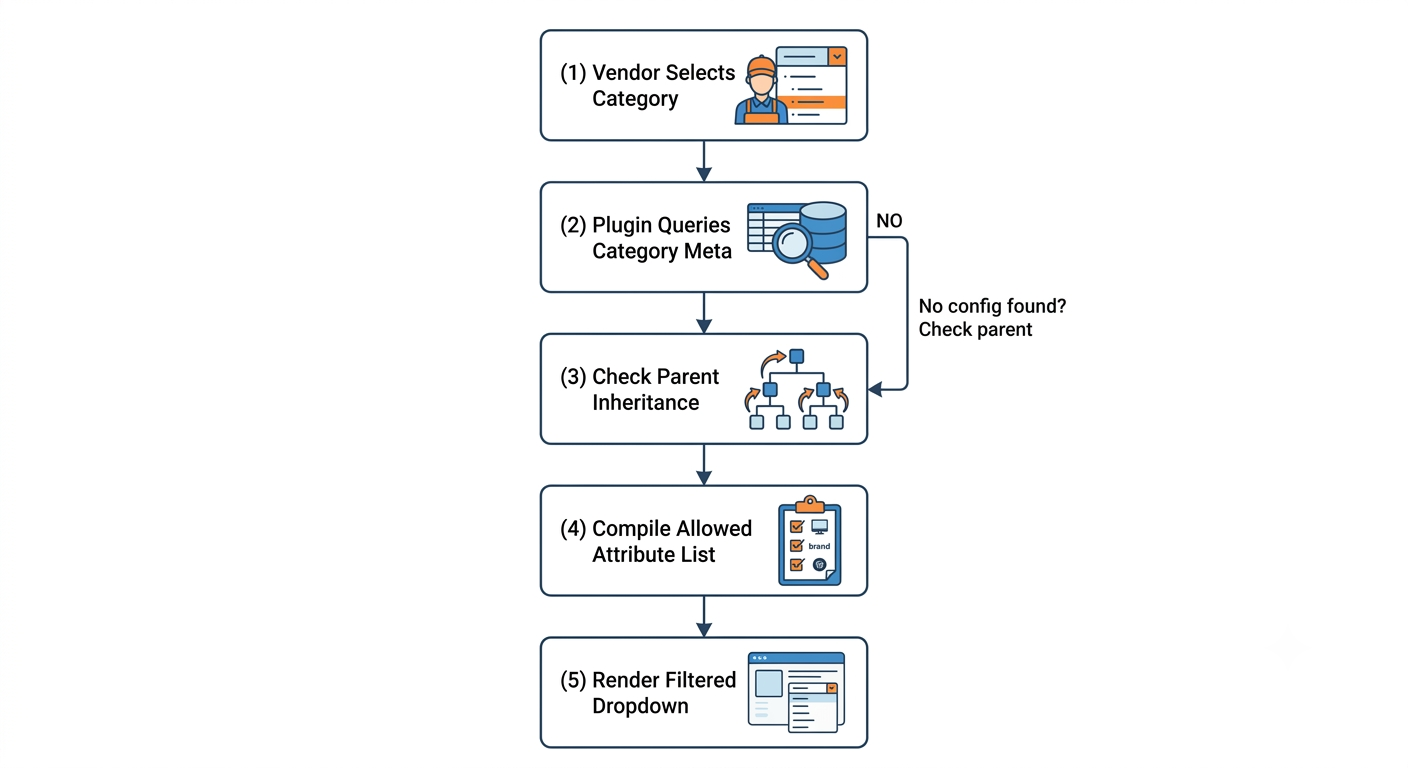
2.3 Hierarchical Category Inheritance System
Manual attribute configuration for every category in a deep taxonomy is unsustainable. The Hierarchical Category Inheritance System (HCIS) addresses this by allowing attribute permissions to flow downward through the category tree. When an administrator assigns attributes to a parent category, all descendants automatically receive those same permissions unless they override them with their own configuration.
HCIS is intelligent about override detection.
It does not merge parent and child configurations; it replaces them. This design decision prevents attribute bloat in child categories. If a parent category “Clothing” allows “Size”, “Color”, and “Material”, and a child category “Wedding Dresses” only allows “Color”, “Silhouette”, and “Train Length”, then products in “Wedding Dresses” will only show the three child-specific attributes. The parent’s “Size” and “Material” attributes will not appear, despite being valid for the parent. This allows for highly specialized subcategories that deviate significantly from their ancestors.
The inheritance system is particularly valuable for marketplaces with regional or seasonal category variations. For example, a parent category “Sporting Goods” might allow standard attributes like “Brand”, “Weight”, and “Dimensions”. A child category “Winter Sports” could inherit these and add “Temperature Rating” and “Waterproofing”.
A further child category “Ski Boots” could override again to show “Boot Flex Rating”, “Sole Type”, and “Closure System”, while dropping “Weight” and “Dimensions” if they are irrelevant to the vendor’s workflow.
Administrators can visualize inheritance paths directly from the category edit screen. While the plugin does not currently display a live inheritance tree diagram, the attribute selector modal indicates inherited attributes through placeholder text in the chip area when viewing a child category. Future roadmap items include a visual tree explorer.
2.4 Dokan Multi-Vendor Native Integration
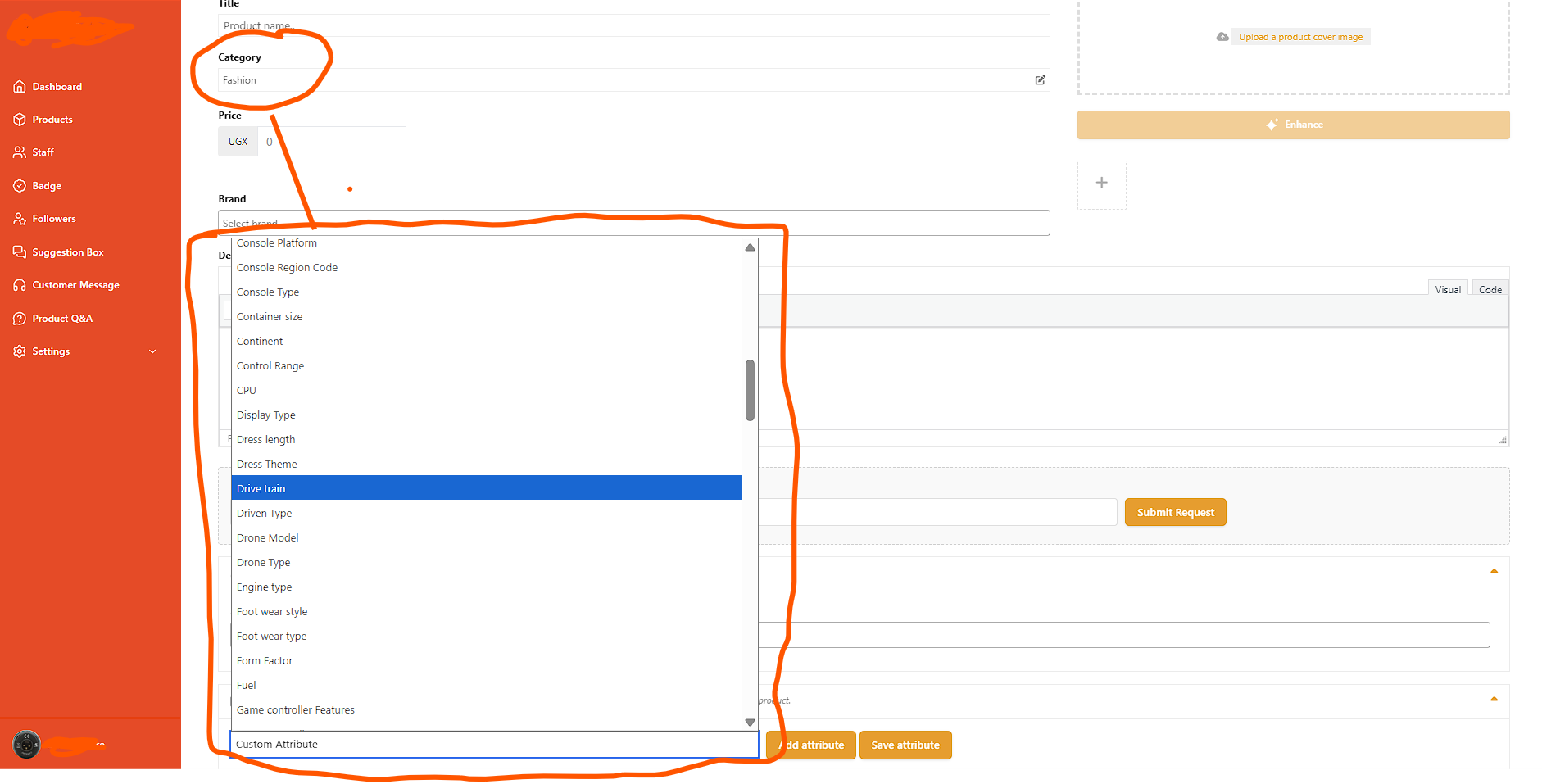
The plugin is not a generic WooCommerce add-on with Dokan compatibility tacked on; it is architected specifically for the Dokan multi-vendor framework. It recognizes Dokan’s unique frontend dashboard structure, its AJAX-powered category selectors, its Select2-enhanced dropdowns, and its product save lifecycle. The integration is zero-configuration from the vendor’s perspective—vendors do not need to learn a new interface or workflow. The attribute dropdowns they have always used simply become smarter.
The JavaScript integration module is loaded conditionally. It only executes on pages where
dokan_is_seller_dashboard() returns true, ensuring that no unnecessary scripts are loaded on the main storefront, blog pages, or administrative backend. The script uses event delegation to attach listeners to Dokan’s category inputs, which may be dynamically injected into the DOM via AJAX during multi-step product creation wizards.A critical integration feature is the handling of Dokan’s “Add Attribute” buttons. Dokan provides multiple entry points for adding attributes to a product: the predefined attribute dropdown, the custom attribute button, and AJAX-loaded attribute rows. The plugin’s JavaScript observes all these entry points through a
MutationObserver attached to the category input container. When the DOM mutates—whether because a vendor selected a new category, removed a category, or loaded a product template—the observer triggers a re-evaluation of the allowed attribute set and immediately updates the available options.The integration also respects Dokan’s vendor capabilities. If a vendor does not have permission to edit products, the plugin does not load its scripts for that user. This prevents privilege escalation and ensures that the plugin’s presence is invisible to unauthorized roles.
2.5 Frontend Layered Navigation Filtering
Customer experience on the frontend is equally critical to vendor experience on the backend. The plugin extends its attribute governance to WooCommerce’s layered navigation system, which displays attribute filters on product category archive pages. In a standard WooCommerce installation, layered navigation displays every attribute that is attached to any product in the current category. This creates a confusing filter panel where customers might see “Memory Type” filters when browsing handbags, or “Blade Material” filters when browsing cookbooks.
The Frontend Layered Navigation Filtering (FLNF) feature resolves this by applying the same category-specific attribute allow-list to the storefront. When a customer visits a category page, the plugin intercepts the attribute query that populates filter widgets. It loads the allowed attribute configuration for the queried category (with full hierarchical inheritance), and constructs a filtered array of attribute objects. Only attributes in the allow-list are passed to the presentation layer.
FLNF is compatible with standard WooCommerce layered nav widgets, most third-party faceted search plugins that rely on WooCommerce’s native attribute queries, and many theme-specific filter implementations. It operates at filter priority 100, which is late enough to catch most plugin modifications but early enough to allow final theme overrides. If your theme uses a completely custom attribute query system (for example, a direct SQL query bypassing WooCommerce’s
WC_Product_Query class), you may need to implement a custom bridge using the developer hooks documented in the Documentation page.The business value of FLNF is measurable. Cleaner filters reduce customer decision paralysis. When customers see only relevant filtering options, they find desired products faster, add to cart more frequently, and generate fewer support tickets asking why filter options do not match the products displayed. For marketplace operators, this translates directly into improved conversion rates and reduced churn.
2.6 Advanced Modal Attribute Selector
The administrative interface for configuring attributes is built around a custom modal dialog that prioritizes usability and efficiency. The Advanced Modal Attribute Selector (AMAS) replaces the standard WordPress meta box—typically a scrollable list of checkboxes—with a modern, searchable, grid-based selection interface.
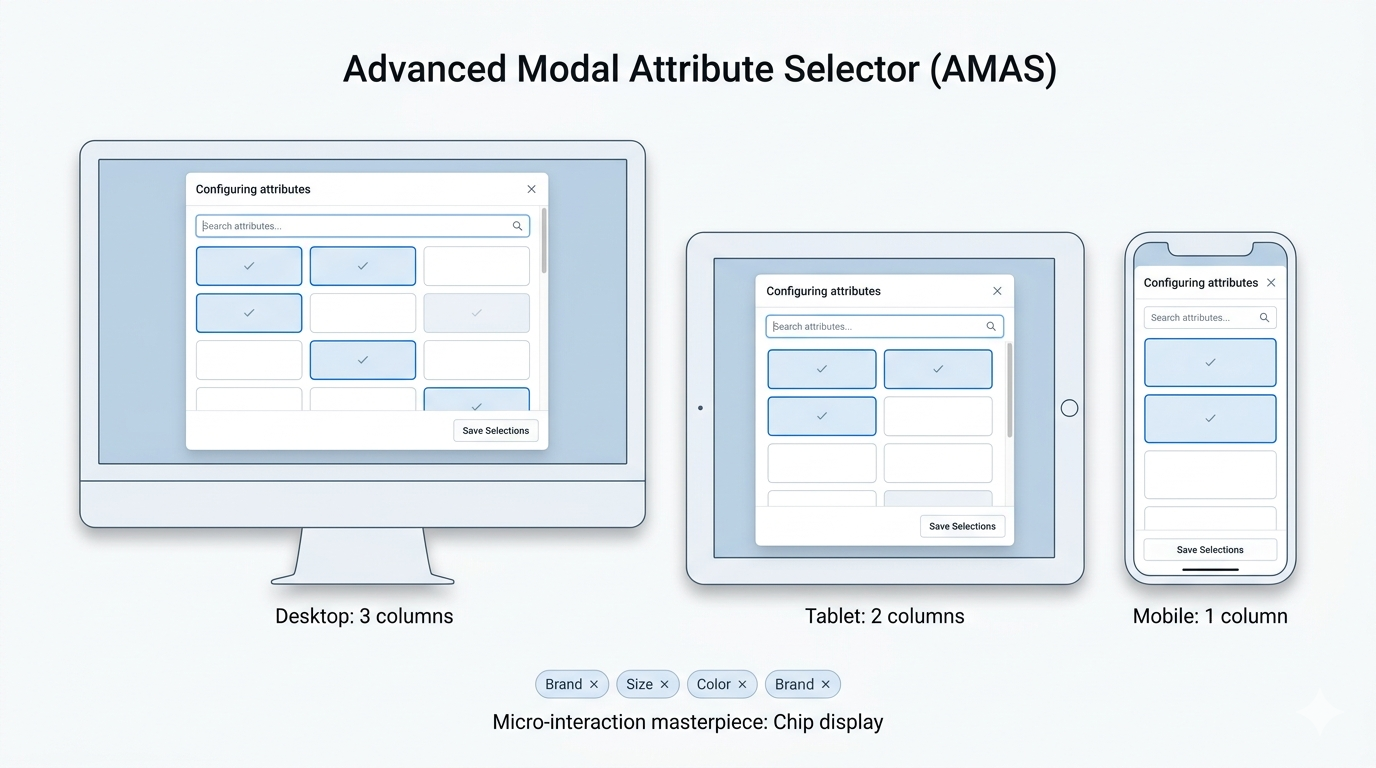
AMAS presents each global attribute as a tactile tile containing the attribute label and a checkbox. The grid layout supports responsive reflow, displaying three columns on desktop, two on tablet, and one on mobile devices. This ensures that administrators can configure categories from any device without horizontal scrolling or zooming.
The search functionality within AMAS uses real-time substring matching. As the administrator types in the search field, the grid instantly hides non-matching tiles and re-reveals them when the search term is cleared. There is no page reload and no AJAX latency because the full attribute list is loaded into the DOM when the modal opens. For marketplaces with hundreds of attributes, this client-side approach guarantees sub-millisecond search responsiveness.
Selected attributes are visually distinct: their tiles receive a primary-color border, a tinted background, and a subtle checkmark icon. The interface supports rapid multi-selection—clicking multiple tiles without closing the modal—and provides a “Save Selections” button that commits the choices and updates the chip display below the configuration button.
The chip display itself is a micro-interaction masterpiece. Each selected attribute appears as a rounded pill with the attribute label and a dismiss “×” button. Clicking “×” removes the attribute from the configuration without reopening the modal. If all attributes are removed, a placeholder text appears prompting the administrator to configure attributes or leave the category unrestricted.
2.7 License Management and Domain Control
The plugin includes a robust License Management and Domain Control (LMDC) system that protects commercial licensing agreements while providing flexibility for legitimate users. The system supports activation, deactivation, background verification, and expiration management.
Upon entering a license key, the system communicates with the licensing server via a secure HTTP POST request.
The request includes the license key, the domain (with
www. prefix stripped for consistency), and a product fingerprint. The server validates the key against the domain and returns an activation token and expiration date. The token is stored locally and used for subsequent background verification checks.Background verification occurs once per day (throttled by a WordPress transient). During this check, the plugin confirms that the license is still valid, the domain is still authorized, and the expiration date has not passed. If the license expires within 30 days, the plugin displays a non-intrusive warning banner on the Attribute Gate page, giving administrators ample notice to renew.
Domain binding prevents unauthorized redistribution. A single license key is typically tied to one production domain. However, the system accommodates standard subdomain variations. Deactivation is fully supported—administrators can deactivate a license from the Attribute Gate page, which frees the key for use on a different domain. This is essential for agencies that build sites on staging domains before migrating to production.
The LMDC system is designed to fail gracefully. If the licensing server is temporarily unreachable, the plugin continues to operate using the last known valid state. It does not immediately disable features upon a single failed ping, ensuring that marketplace operations are not disrupted by transient network issues or server maintenance windows.
2.8 Performance Optimizations and Scalability
The plugin is engineered for high-performance operation under enterprise load. Every database query is constrained to indexed columns. The attribute resolution algorithm uses in-memory caching where possible and avoids nested queries by flattening the category hierarchy during the initial page load (for the vendor dashboard JavaScript) or during the term meta lookup (for backend operations).
The JavaScript payload injected into the Dokan dashboard is minimal. The
window.X7M configuration object contains only category IDs and their associated attribute slug arrays. For a marketplace with 1,000 categories and an average of five attributes per category, the JSON payload is typically under 15KB uncompressed and under 4KB with gzip compression. This is negligible compared to the size of standard WooCommerce and Dokan script bundles.Server-side, the product save-time sanitization hooks into WooCommerce’s existing save routines without triggering additional database writes beyond what WooCommerce already performs. The plugin does not create custom database tables, cron jobs (beyond the daily license check transient), or background processes. This ensures compatibility with managed WordPress hosts that restrict long-running operations or plugin-generated tables.
2.9 Compatibility Matrix and Integration Ecosystem
Version 3.2 maintains formal compatibility with the following ecosystem components:
-
WordPress: 5.8 through 6.5+
-
WooCommerce: 5.0 through 8.0+
-
Dokan Lite: 3.0 through 3.9+
-
Dokan Pro: 3.0 through 3.9+
-
PHP: 7.4 through 8.3
-
MySQL/MariaDB: 5.7+ / 10.3+
-
Select2: Version 4.x (bundled with WooCommerce)
The plugin is tested against standard WordPress themes including Storefront, Astra, Flatsome, and WoodMart. It does not modify theme templates or inject CSS into the frontend except for a single hidden rule that suppresses disabled Select2 options. This minimal CSS footprint prevents visual conflicts with theme styling.
2.10 Feature Roadmap and Future Enhancements
While version 3.2 provides a comprehensive feature set, the development roadmap includes several advanced capabilities planned for future releases:
-
Attribute Templates: Save and apply attribute configurations as reusable templates across multiple categories.
-
Vendor-Specific Overrides: Allow individual vendors to request additional attributes for their niche products, subject to admin approval.
-
REST API Endpoints: Full CRUD access to category attribute mappings via WooCommerce REST API v3.
-
Import/Export Tool: CSV and JSON import/export for bulk category attribute configuration during marketplace migrations.
-
Analytics Dashboard: Report on which attributes are most frequently used by vendors and which categories have the highest configuration coverage.

