



Security
SECURITY
5.1 Security Architecture and Design Philosophy
Security in Dokan Conditional Category Attributes is approached as a multi-layered discipline encompassing code integrity, data validation, access control, and communication encryption. The plugin handles sensitive commercial licensing information, manipulates product taxonomy data, and executes within the privileged context of vendor dashboards. Consequently, every architectural decision prioritizes the confidentiality, integrity, and availability of the marketplace ecosystem.
The plugin adheres to WordPress’s security best practices and the principle of least privilege. It does not create unnecessary user roles, does not expose administrative functionality to frontend users, and does not transmit customer or vendor personal data to external servers. The only external communication occurs between your server and the licensing validation server, and this communication is strictly limited to license key, domain name, and activation state.
This security documentation is organized by threat vector, explaining how the plugin mitigates risks at each layer of the technology stack.
5.2 Proprietary License Protection System
The plugin includes a license protection mechanism that safeguards commercial licensing agreements. This system uses encoded function references and option storage to prevent trivial tampering or circumvention. While the exact implementation details are proprietary, the security model can be understood at a high level.
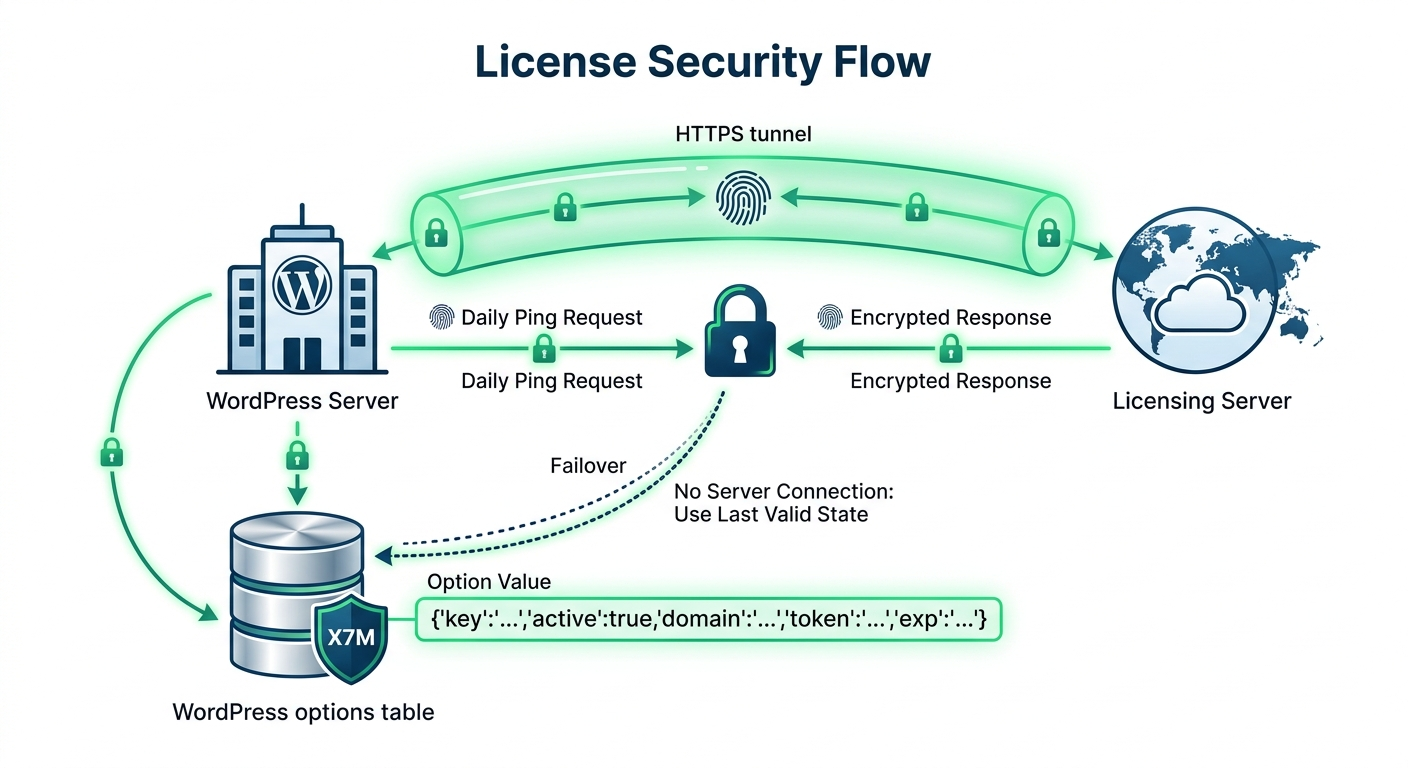
The license state is stored in the WordPress options table under a dynamically generated option name. This name is derived from a salted hash of the site URL, making it non-obvious and resistant to casual inspection.
The option value itself is a serialized array containing the license key, activation status, domain, token, and expiration timestamp. Direct modification of this option by users with database access is possible (as with any WordPress option), but the activation token is validated server-side during background checks, meaning that local tampering alone cannot produce a valid active state.
The background verification system communicates with the licensing server once per day. This check validates that the license is still active, the domain is authorized, and the expiration date has not passed. The communication occurs over HTTPS and includes a product fingerprint. If the server responds with an invalidation signal (for example, due to a chargeback or license revocation), the plugin updates its local state accordingly.
The license protection system is designed to be robust but not draconian. If the licensing server is unreachable due to network issues, the plugin continues to operate under the last known valid state. It does not immediately disable functionality, ensuring business continuity during temporary outages.
5.3 Data Sanitization and Validation
The plugin implements rigorous data sanitization at every input and output boundary.
Input Sanitization: When administrators save category attribute configurations, the submitted attribute slugs are passed through
sanitize_text_field via the array mapping function array_map('sanitize_text_field', $_POST['allowed_attributes']). This strips malicious HTML, JavaScript, and SQL fragments from the attribute identifiers before they are written to the database. The plugin also verifies that the submitted values correspond to actual registered attribute taxonomies, preventing the injection of arbitrary strings into the metadata system.Output Escaping: All data rendered in HTML contexts is escaped using WordPress’s standard escaping functions. The license key input field uses
esc_attr() for its value attribute. The attribute chips in the administrative interface use esc_html() for labels. The window.X7M JavaScript object is encoded using json_encode(), which safely escapes quotes and special characters for script context insertion.Database Queries: The plugin does not perform custom SQL queries. All database interactions occur through WordPress’s established APIs:
get_option(), update_option(), get_term_meta(), update_term_meta(), and get_terms(). These APIs use prepared statements and parameterized queries internally, providing robust protection against SQL injection attacks. Because the plugin never concatenates user input into raw SQL strings, the attack surface for SQL injection is effectively eliminated.Product Save Sanitization: During the server-side product attribute filter, the plugin operates on WooCommerce product objects rather than direct database tables. It uses WooCommerce’s
set_attributes() and save() methods, which handle their own internal validation. The plugin merely computes the filtered attribute array and passes it to the WooCommerce API, ensuring that the persistence layer remains under WooCommerce’s control.5.4 API Communication Security
Communication with the licensing server is secured through multiple mechanisms.
Transport Layer Security: All license activation, deactivation, and verification requests are transmitted over HTTPS. The plugin uses WordPress’s
wp_remote_post() function, which validates SSL certificates against the system’s CA bundle. If your server has an outdated CA certificate store, HTTPS requests may fail with SSL verification errors. Keeping your server’s CA bundle updated is essential for uninterrupted license communication.Request Integrity: The HTTP POST body includes the license key, domain, and a product identifier. While the communication is not cryptographically signed with HMAC, the combination of HTTPS transport and server-side validation provides sufficient protection against man-in-the-middle attacks for this use case. The licensing server maintains an authoritative record of which license keys are valid and which domains are authorized, rejecting any requests that fail these checks.
User-Agent Identification: Requests include a User-Agent header identifying the WordPress version and site URL. This assists the licensing server in detecting anomalous request patterns, such as a single license key being used from multiple disparate domains simultaneously.
Timeout Handling: API requests specify a 30-second timeout. If the licensing server does not respond within this window, the plugin treats the request as failed and retains the last known valid state. This prevents slow licensing server responses from causing PHP execution timeouts on your marketplace.
5.5 Frontend and Script Security
The plugin’s frontend footprint is intentionally minimal to reduce the attack surface.
Script Injection: The only JavaScript injected into the frontend is the
window.X7M configuration object on Dokan vendor dashboard pages. This script is not injected on customer-facing pages, blog posts, or administrative pages unrelated to Dokan. The configuration object contains only category IDs and attribute slugs—no executable code, no user data, and no sensitive licensing information.Content Security Policy (CSP) Compatibility: The plugin’s inline scripts and styles are compatible with standard Content Security Policies. However, if your site implements a strict CSP that prohibits inline scripts (
script-src 'self'), the Dokan dashboard integration will fail because WordPress and Dokan themselves rely heavily on inline JavaScript. The plugin follows the same patterns as core WordPress and is no more restrictive than the platform it extends.XSS Prevention: The plugin does not accept user-generated content that is rendered without escaping. All attribute labels are sourced from the WooCommerce attribute taxonomy table, which is only writable by administrators. The modal interface renders these labels using
esc_html(), preventing stored XSS attacks even if an administrator somehow injected malicious HTML into an attribute label.5.7 File System and Code Integrity
The plugin is distributed as a standard PHP file set. Upon installation, you should verify the integrity of the plugin files.
File Permissions: Plugin files should be readable by the web server but not writable by the web server user (unless you are actively updating the plugin through the WordPress admin). Recommended permissions are
644 for files and 755 for directories. Writable plugin files increase the risk of remote code execution if another vulnerability allows file uploads or modifications.Checksum Verification: If you obtained the plugin from an official distribution channel, verify the file checksums against the published manifest. Unauthorized modifications to the plugin files may indicate compromise. The plugin does not currently include an automatic integrity check, but you can manually compare MD5 or SHA-256 hashes.
Update Security: Always update the plugin through official channels. If an update is offered through an unofficial repository or nulled distribution, do not install it. Nulled plugins frequently contain backdoors, malware, or broken license checks that expose your marketplace to severe security risks.
5.8 Audit Logging and Monitoring
While the plugin does not include a built-in audit log, it integrates seamlessly with standard WordPress logging practices.
Error Logging: When
WP_DEBUG_LOG is enabled, the plugin’s licensing failures and API errors are captured in the WordPress debug log. Monitor this log for repeated activation failures, which may indicate brute-force attempts against your license key or network intrusion attempts against the licensing endpoint.Action Logging: Third-party audit plugins (such as WP Security Audit Log or Activity Log) can track changes to WordPress options and term metadata. Because the plugin stores its configuration in these standard locations, an audit plugin will record when an administrator modifies category attribute mappings or changes the license state. This provides non-repudiation for administrative actions.
Failed Login Monitoring: While unrelated to the plugin’s core functionality, protecting the WordPress admin account is critical. Ensure that brute-force protection is active on
/wp-login.php and that administrative accounts use strong, unique passwords combined with two-factor authentication.5.9 Compliance and Data Protection
The plugin is designed to comply with major data protection frameworks by minimizing data collection.
GDPR: The plugin does not collect, process, or store personal data belonging to customers, vendors, or site visitors. The only data transmitted to the licensing server is the site domain and license key—both of which are technical identifiers, not personal data. No cookies are set by the plugin. No tracking pixels are included. If you operate under GDPR, you do not need to add the plugin to your privacy policy as a data processor.
CCPA: Similarly, the plugin does not sell or share personal information. It has no advertising integrations and no analytics beacons.
SOC 2 and ISO 27001: While the plugin itself is not certified under these frameworks, its minimal data footprint and reliance on WordPress’s security model make it compatible with environments pursuing these certifications. The plugin does not introduce shadow IT components, undocumented APIs, or unapproved third-party dependencies.

