



System Status
SYSTEM STATUS
4.1 Purpose of System Status Monitoring
The System Status page provides a comprehensive diagnostic overview of the environment in which Dokan Conditional Category Attributes operates. Unlike the troubleshooting guide, which addresses specific symptoms, the System Status framework is proactive—it helps administrators identify latent incompatibilities, resource constraints, and configuration drift before they manifest as user-facing failures. This page documents every environmental factor that influences plugin behavior, from server-level PHP extensions to application-level WordPress settings.
Regular review of system status is recommended during major updates (WordPress core, WooCommerce, Dokan, or the plugin itself), after server migrations, and during periods of marketplace scaling. A healthy system status profile ensures that attribute filtering operates with maximum performance and reliability.
4.2 Server Infrastructure Requirements
The plugin operates within the standard WordPress LAMP/LEMP stack but has specific requirements that must be verified at the infrastructure level.
PHP Version: PHP 7.4 is the absolute minimum. PHP 8.0 or higher is strongly recommended for improved performance and security. The plugin’s codebase is compatible with PHP 8.3, but some legacy hosting environments may still run PHP 7.4. Note that PHP 7.4 reached end-of-life and no longer receives security patches. If your host provides only PHP 7.4, consider this a critical infrastructure risk rather than merely a plugin compatibility concern.
PHP Extensions: The following extensions must be enabled:
-
cURL: Required for license activation and background verification API calls.
-
mbstring: Required for proper handling of multibyte attribute labels (e.g., Chinese, Japanese, Arabic characters).
-
json: Required for encoding the
window.X7Mconfiguration object. -
SimpleXML: Used internally by WordPress’s HTTP API for parsing certain response types.
-
openssl: Required for secure HTTPS communication with the licensing server.
Memory Limits: WooCommerce and Dokan are memory-intensive applications. The plugin adds marginal overhead, but the baseline requirements remain significant. A
memory_limit of 256MB is the practical minimum for a multi-vendor marketplace. During bulk product imports or category updates, memory usage may spike. If you encounter “Allowed memory size exhausted” errors during attribute configuration saves, increase the limit to 512MB or higher.Execution Time: The plugin does not perform long-running operations, but WooCommerce’s product save hooks can be expensive. A
max_execution_time of 30 seconds is standard, but 60 seconds is safer for large catalogs.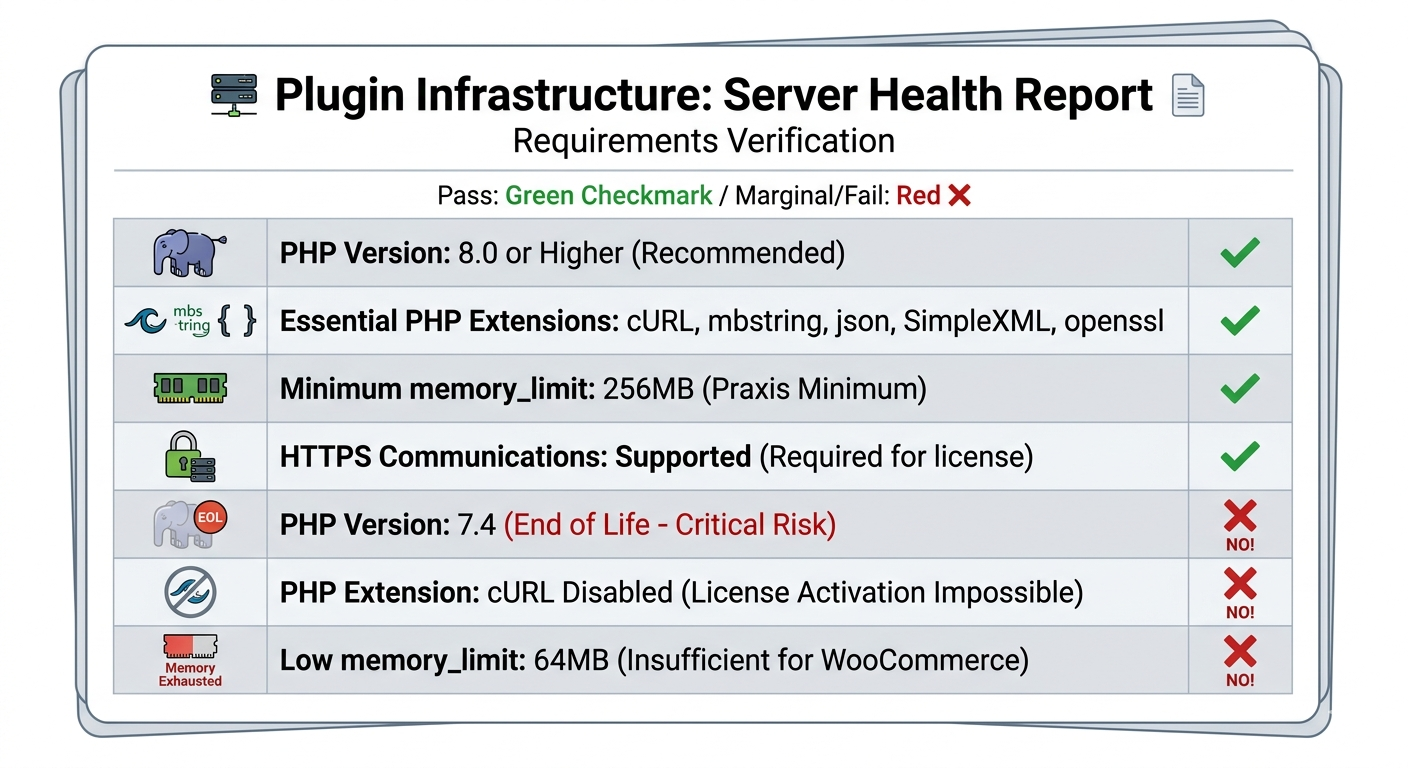
4.3 WordPress Environment Analysis
The WordPress configuration must meet several criteria for optimal plugin operation.
WordPress Version: Version 5.8 or higher is required. The plugin uses block editor-compatible admin styling and modern hook signatures introduced in WordPress 5.8. Older versions may not render the attribute selector modal correctly or may fail to register the term meta boxes.
Permalink Structure: While the plugin does not directly rely on permalinks, Dokan and WooCommerce require a non-default permalink structure (anything other than plain
?p=123) for proper dashboard routing. Ensure that permalinks are set to “Post name” or a custom structure including %postname%.Multisite Compatibility: The plugin is compatible with WordPress Multisite. However, the license is bound to the network’s primary domain. If you run a multisite installation with mapped domains, each mapped domain may require a separate license or an enterprise multi-domain license. The plugin stores configuration in site-specific options and term meta tables, so attribute mappings are not shared across network sites unless explicitly synchronized by a network administrator.
REST API Availability: The plugin does not currently expose its own REST endpoints, but it relies on WordPress’s internal REST API for certain administrative functions (such as the block editor context and AJAX handlers). If the REST API is disabled via a plugin or server rule, the modal interface may fail to load attribute data in some edge cases. Ensure that the REST API is accessible at
/wp-json/.Debug Mode: For production marketplaces,
WP_DEBUG should be set to false in wp-config.php. Debug mode exposes verbose error messages that can reveal sensitive path information. If you must enable debug mode temporarily for troubleshooting, ensure that WP_DEBUG_LOG is set to true and WP_DEBUG_DISPLAY is set to false, directing errors to a log file rather than the browser.4.4 WooCommerce Compatibility Profile
As a WooCommerce-dependent plugin, system status must account for the e-commerce framework’s health.
WooCommerce Version: Version 5.0 or higher is required. The plugin hooks into WooCommerce product attribute APIs that were stabilized in version 5.0. If you are running WooCommerce 4.x or lower, the attribute taxonomy queries may return unexpected structures, leading to empty attribute lists in the modal.
Database Tables: Verify that the following WooCommerce tables exist and are not corrupted:
-
woocommerce_attribute_taxonomies: Stores global attribute definitions. If this table is missing, the plugin will display an empty attribute grid. -
woocommerce_term_relationships: Links products to categories. Corruption here causes category detection to fail during product save sanitization. -
woocommerce_termmeta: Stores term metadata. The plugin writes to WordPress’s nativetermmetatable, but WooCommerce’s health depends on the broader term metadata ecosystem.
Product Types: The plugin is designed for standard WooCommerce simple and variable products. It does not explicitly support grouped products, external/affiliate products, or custom product types introduced by third-party plugins. While it will not break these product types, the attribute filtering logic may not apply to their edit interfaces if those interfaces use custom templates.
Attribute Types: WooCommerce supports text, select, and global attribute types. The plugin filters all global attributes (those with taxonomies). It does not filter custom text attributes added per-product. If your marketplace uses custom attribute types introduced by extensions (such as swatches, color pickers, or image selectors), these are generally compatible as long as they rely on the underlying global attribute taxonomy.
4.5 Dokan Integration Status
The plugin’s value proposition is tightly coupled to Dokan. System status must verify Dokan health.
Dokan Version: Dokan Lite or Pro 3.0 or higher is required. The plugin detects Dokan’s presence by checking for the
dokan_is_seller_dashboard() function. If you are running Dokan 2.x, this function may not exist, and the plugin will silently fail to inject its JavaScript.Vendor Dashboard URL: Dokan typically operates the vendor dashboard at
/dashboard/. If you have customized this slug via Dokan settings, ensure that the new slug does not conflict with existing WordPress pages or rewrite rules. The plugin’s JavaScript injection relies on Dokan’s internal routing logic to identify dashboard pages.Vendor Capabilities: Dokan uses a custom user role (
seller) with specific capabilities. The plugin checks for the dokan_add_product or equivalent capability before rendering its interfaces. If you have modified Dokan’s capability map using a role editor plugin, ensure that vendors still retain the ability to read product attributes and edit products.Theme Compatibility: Dokan works best with WooCommerce-compatible themes. If your theme does not declare WooCommerce support (
add_theme_support('woocommerce')), Dokan’s frontend dashboard may render unpredictably, and the plugin’s attribute filtering may not attach to the correct DOM elements.4.7 Database Health and Integrity
The plugin’s data layer is lightweight but depends on a healthy WordPress database.
Table Engine: WordPress tables should use the InnoDB storage engine. InnoDB provides row-level locking and transactional safety, which is important when multiple vendors simultaneously save products with category attribute metadata. MyISAM tables can lead to corruption under high concurrency.
Auto-Increment Integrity: The
wp_termmeta table uses an auto-increment primary key. If this key sequence becomes corrupted (for example, due to a failed import), new metadata rows may fail to insert. Repair the table if you encounter “Duplicate entry” errors.Collation: The database and tables should use a UTF-8 compatible collation, preferably
utf8mb4_unicode_ci. This ensures that attribute labels containing emoji, mathematical symbols, or non-Latin scripts are stored and retrieved correctly.Size and Bloat: Over time, the
wp_options table can accumulate transients and expired session data. While the plugin only stores one primary option row and one transient, general table bloat can slow down WordPress’s autoload query, indirectly affecting every page load. Regular database maintenance is recommended.4.8 SSL and HTTPS Requirements
The plugin requires HTTPS for license communication. If your site operates over HTTP, the licensing server may reject activation requests as a security measure. Modern browsers also block mixed-content requests, meaning that even if the server accepted HTTP, the browser might prevent the JavaScript license ping from executing.
Ensure that your WordPress Address and Site Address in Settings > General both use
https://. If you recently migrated to HTTPS, update these URLs and verify that .htaccess or server rules properly redirect HTTP to HTTPS. Mixed content (loading HTTP resources on an HTTPS page) can break the plugin’s administrative styling and JavaScript functionality.4.9 Diagnostic Tools and Self-Checks
Administrators can perform several self-checks without external support.
Option Verification: Use a database management tool or a plugin like “WP-CLI” to inspect the option value. Run
wp option get wc_[hash]_attr_cfg (replace with the actual option name from your database). The output should be a serialized array containing keys k, s, a, t, and e.Term Meta Verification: Run
wp term meta get <term_id> _allowed_attributes for any category ID. The output should be an array of attribute slugs.JavaScript Verification: In the browser console on the Dokan dashboard, type
window.X7M and press Enter. It should return an object mapping category IDs to arrays of attribute slugs. If it returns {} or undefined, the server-side injection failed.Hook Verification: Install a debugging plugin or add temporary code to
functions.php to list all hooks attached to woocommerce_layered_nav_filters. The plugin’s _wc_frontend_filter function should appear at priority 100.4.10 Environmental Change Log
Maintain a log of environmental changes that may affect plugin behavior. Record the date and details of:
-
WordPress core updates
-
WooCommerce version changes
-
Dokan version changes
-
PHP version upgrades
-
Theme switches or updates
-
New plugin installations
-
Server migrations or IP changes
-
SSL certificate renewals

