



License
LICENSE
6.1 Licensing Framework and Commercial Terms
Dokan Conditional Category Attributes is distributed under a commercial software license that grants the purchaser a non-exclusive, non-transferable right to use the plugin on a specified number of domains. The license framework is designed to balance fair use for legitimate customers with protection against unauthorized redistribution. This page provides exhaustive detail on license types, activation mechanics, domain policies, renewals, and compliance obligations.
By installing and activating the plugin, you agree to the commercial terms outlined in your purchase agreement. These terms supplement the standard WordPress GPL licensing of any underlying WordPress-compatible code, but the plugin’s proprietary licensing system governs access to updates, support, and certain advanced features.
6.2 License Types and Tiers
The plugin is available under multiple license tiers to accommodate different marketplace scales and organizational needs.
Single Site License: Valid for one production domain and one staging or development subdomain. Ideal for individual marketplace operators or small businesses launching a single Dokan-powered store. Includes one year of updates and standard email support.
Multi-Site License: Valid for up to five production domains within the same business entity. Suitable for agencies managing multiple client marketplaces or businesses operating regional storefronts. Includes one year of updates and priority support with a 12-hour response time commitment.
Developer License: Valid for unlimited domains owned or managed by the license holder. This tier is restricted to verified development agencies and freelancers who build sites for clients. It includes lifetime updates, priority support, and access to beta releases. Developer licenses are subject to additional verification and may require proof of business registration.
Enterprise License: Custom agreement for large organizations with complex requirements. May include white-label rights, custom feature development, SLA-backed support with phone access, and dedicated account management. Enterprise terms are negotiated on a per-contract basis.
Each license tier is associated with a specific price point and support entitlement. Upgrading from a lower tier to a higher tier is permitted at any time; the upgrade price is typically the difference between the two tiers plus a prorated adjustment based on remaining support term.
6.3 Activation Process and Domain Binding
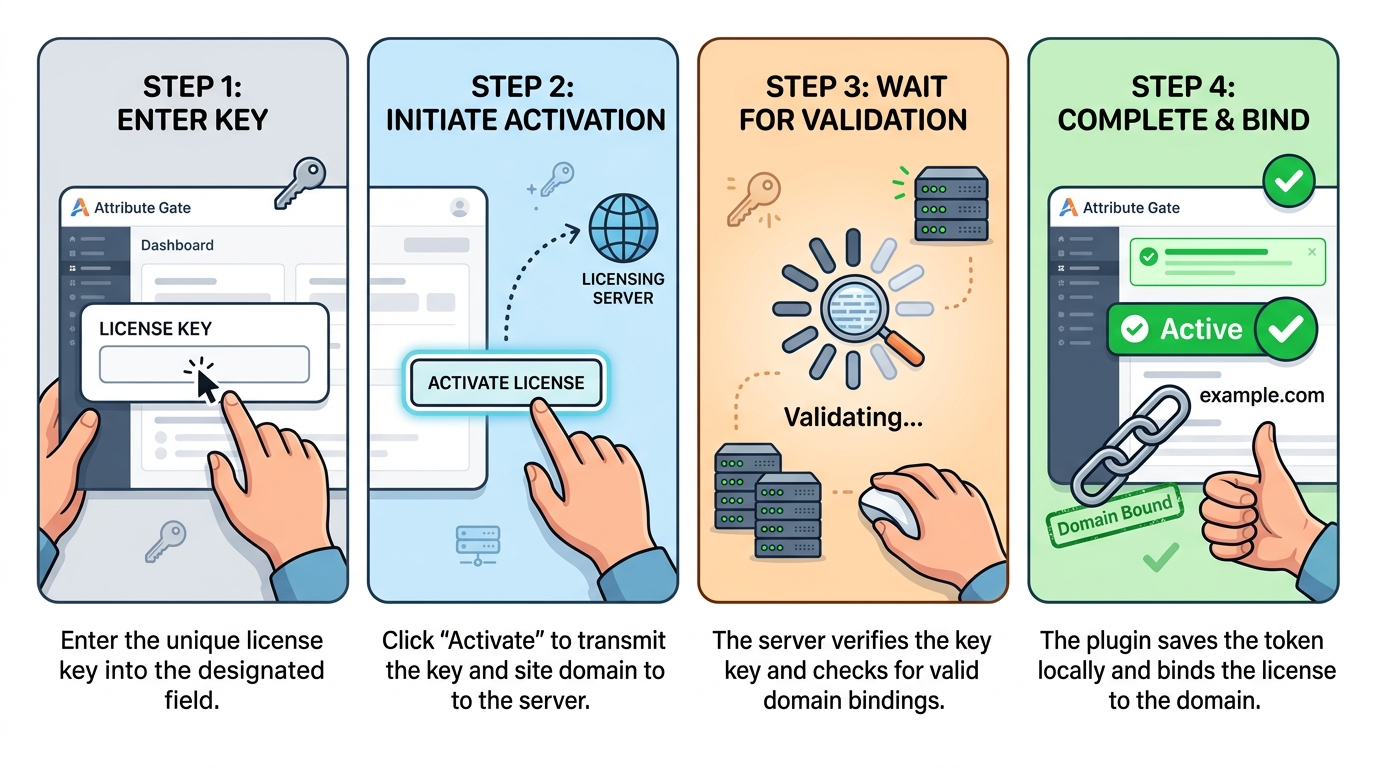
Activation is the process of binding a license key to a specific WordPress installation. The process is initiated from the Attribute Gate page in the WordPress administrative dashboard.
Step 1: Key Entry
Enter the license key into the provided field. Keys follow the format
Enter the license key into the provided field. Keys follow the format
XXXX-XXXX-XXXX-XXXX and are case-insensitive. The input field includes placeholder text and visual validation indicators.Step 2: Domain Resolution
Upon submission, the plugin extracts the site URL from WordPress settings, strips the
Upon submission, the plugin extracts the site URL from WordPress settings, strips the
www. prefix, and transmits the domain along with the license key to the licensing server. The server checks whether the key is valid, whether it has remaining domain slots, and whether the domain matches any existing bindings.Step 3: Server Validation
If validation succeeds, the server returns an activation token and an expiration timestamp. The token is a cryptographically random string that serves as proof of activation. The expiration timestamp indicates the end of the support and update entitlement period, not the end of plugin functionality.
If validation succeeds, the server returns an activation token and an expiration timestamp. The token is a cryptographically random string that serves as proof of activation. The expiration timestamp indicates the end of the support and update entitlement period, not the end of plugin functionality.
Step 4: Local Storage
The plugin stores the activation response in the WordPress options table. The status badge on the Attribute Gate page transitions to “Active”. The plugin is now fully operational.
The plugin stores the activation response in the WordPress options table. The status badge on the Attribute Gate page transitions to “Active”. The plugin is now fully operational.
Domain Binding Rules:
-
Each production domain counts as one binding.
-
Subdomains (e.g.,
staging.example.com,dev.example.com) are typically permitted under the same license but do not count as separate production bindings if they share the root domain. -
Localhost and
.localdomains are permitted for development but may require manual activation bypass; contact support for assistance. -
Changing the site URL in WordPress settings after activation may invalidate the binding if the new domain is not covered by the license.
6.4 Deactivation and Domain Release
Deactivation frees a license key from its current domain binding, allowing it to be reused elsewhere. This is essential for site migrations, domain changes, or project handovers.
To deactivate, navigate to the Attribute Gate page and click the Deactivate License button.
The plugin will prompt for confirmation via a browser dialog to prevent accidental clicks. Upon confirmation, the plugin sends a deactivation request to the licensing server, including the license key, domain, and activation token. The server invalidates the token and decrements the domain count associated with the key.
After deactivation, the local option is deleted from the WordPress database. The plugin returns to an inactive state. All attribute filtering functionality ceases, and vendors will see the full unfiltered attribute list in their dashboards. The category configuration metadata remains intact in the database; it is not deleted during deactivation. This means that if you reactivate the same license (or a new license) later, your category attribute mappings will be preserved.
Important: If you plan to migrate the plugin to a new domain, always deactivate on the old domain first. If the old domain is no longer accessible (for example, due to server failure or domain expiration), contact support with your license key and proof of ownership. Support can manually release the domain binding from the licensing server.
6.5 License Transfers and Ownership Changes
License keys are generally non-transferable between business entities. However, the following scenarios are accommodated:
Agency-to-Client Transfer: If a developer purchased a Single Site License on behalf of a client and needs to transfer ownership to the client, the developer must contact support with the license key and the client’s business details. Support will verify the transfer request and update the licensing records.
Business Acquisition: If a company acquires another company and wishes to assume its licenses, the acquiring company must provide documentation of the acquisition (such as a purchase agreement or legal filing) and the original license keys. Support will migrate the licenses to the new owner’s account.
Marketplace Resale: Reselling license keys on third-party marketplaces is strictly prohibited. Keys identified in unauthorized resale channels will be revoked without refund.
6.6 Renewals, Expirations, and Grace Periods
Licenses include an initial entitlement period (typically one year) during which the purchaser receives plugin updates and support. As the expiration date approaches, the plugin displays a warning banner on the Attribute Gate page.
Renewal Process: Renewals can be initiated through the original purchase channel or through the customer account portal. The renewal extends the support and update entitlement by one year from the expiration date (not from the renewal purchase date). Early renewal does not result in lost time.
Expired License Behavior: When a license expires, the plugin does not immediately cease functioning. Existing installations continue to operate with full feature access. However, access to updates, security patches, and support tickets is suspended.
If the license remains expired for an extended period (typically 90 days), the plugin may transition to a reduced functionality mode where new attribute configurations cannot be saved, but existing configurations continue to filter attributes. This grace period ensures that marketplace operations are not disrupted by administrative oversights.
Reactivation: An expired license can be reactivated at any time by purchasing a renewal. No data is lost during expiration.
6.7 Enterprise and Bulk Licensing
Organizations operating multiple marketplaces or white-label platforms may require bulk licensing arrangements.
Volume Discounts: Purchases of five or more Single Site Licenses simultaneously qualify for a volume discount. The discount percentage increases with quantity: 10% for 5–9 licenses, 15% for 10–24 licenses, and 20% for 25+ licenses.
Master License Key: Enterprise clients may be issued a master license key that supports a predefined number of automatic activations. This eliminates the need to manage individual keys for each domain. Master keys are monitored for abuse; excessive activations beyond the purchased tier will trigger an administrative review.
White-Label Rights: Enterprise licenses may include the right to rebrand the plugin for client deployments. White-label terms require that the original copyright notices remain intact in source code comments and that the licensing system is not circumvented or removed.
6.8 Compliance, Refunds, and Legal
License Compliance: The plugin includes technical measures to enforce license compliance, including domain binding and background verification. Attempting to circumvent these measures (for example, by modifying plugin files to bypass license checks) constitutes a breach of the license agreement and may result in termination of the license, forfeiture of support entitlements, and legal action under applicable copyright and computer fraud statutes.
Refund Policy: The plugin is sold with a 14-day money-back guarantee. If the plugin does not meet your requirements and cannot be made to work after reasonable support intervention, you may request a full refund within 14 days of purchase. Refunds are not available for renewals or for licenses that have been active for more than 14 days. To request a refund, contact support with your order number and a brief explanation.
Liability Disclaimer: The plugin is provided “as is” without warranties of merchantability or fitness for a particular purpose, except where prohibited by law. The developer is not liable for lost profits, data loss, or business interruption arising from plugin use or failure. This limitation is standard for commercial software and is outlined in detail in the End User License Agreement (EULA) presented at purchase.
Governing Law: The license agreement is governed by the laws of the jurisdiction in which the developer is registered, without regard to conflict of law principles. Disputes shall be resolved through binding arbitration in the developer’s jurisdiction unless both parties agree to an alternative forum.
6.9 Support Tiers and Service Level Agreements
Support is provided exclusively to holders of active licenses. The scope and speed of support depend on the license tier.
Standard Support (Single Site): Email-based support with a 24-hour response time on business days. Support covers installation, configuration, and troubleshooting of plugin-specific issues. It does not cover custom development, theme customization, or conflicts with third-party plugins outside the WooCommerce/Dokan ecosystem.
Priority Support (Multi-Site and Developer): Email-based support with a 12-hour response time on business days. Includes assistance with minor customizations and conflict resolution with popular third-party plugins.
Enterprise Support (Enterprise License): Dedicated support channel with phone access, 4-hour response time for critical issues, and quarterly business reviews. Includes code review for custom integrations and early access to security patches.
Community Resources: While direct support requires an active license, users may access public documentation, video tutorials, and community forums for self-service assistance. These resources are maintained as a courtesy and do not constitute a support obligation.
6.10 Frequently Asked License Questions
Q: Can I use the plugin on a subdomain with a Single Site License?
A: Yes, one staging or development subdomain is permitted per production domain under a Single Site License.
A: Yes, one staging or development subdomain is permitted per production domain under a Single Site License.
Q: What happens if I change my domain after activation?
A: If the new domain is not covered by your license, the plugin will detect a mismatch during the next background verification. Deactivate the license on the old domain and reactivate on the new domain. If you cannot access the old domain, contact support.
A: If the new domain is not covered by your license, the plugin will detect a mismatch during the next background verification. Deactivate the license on the old domain and reactivate on the new domain. If you cannot access the old domain, contact support.
Q: Does the plugin phone home continuously?
A: No. The plugin contacts the licensing server once per day for a brief verification ping. It does not transmit product data, customer data, or analytics.
A: No. The plugin contacts the licensing server once per day for a brief verification ping. It does not transmit product data, customer data, or analytics.
Q: Can I get a refund after 14 days if I haven’t activated the license?
A: Refund requests are evaluated on a case-by-case basis after the 14-day window, but approval is not guaranteed. The 14-day guarantee is the standard policy.
A: Refund requests are evaluated on a case-by-case basis after the 14-day window, but approval is not guaranteed. The 14-day guarantee is the standard policy.
Q: Is the license key required for the plugin to function?
A: Yes. The attribute filtering features require an active license. Without activation, the plugin remains dormant and does not modify the Dokan dashboard or frontend filters.
A: Yes. The attribute filtering features require an active license. Without activation, the plugin remains dormant and does not modify the Dokan dashboard or frontend filters.

